SAVE TWO PARTS
A public recipe link and a personal note are separate records. Keep the full recipe and your adjustments together in a readable document; importing the link does not give another app access to your Mealime account.
Mealime closes on 21 October 2026. Its official notice makes Pro recipes and features available to all users and says personal data will be deleted when the app shuts down. The recipe catalogue continues in free Meals Hub, but the notice does not promise a transfer of private recipe notes. Save those while you can still read them. Mealime’s transition notice.
Where Mealime puts recipe notes.
Mealime’s notes guide, updated 29 July 2019, documents this route: open a recipe from the Meal Plan screen, tap More → Add Note, enter the note and tap Done. Its Pro label is historical; use the current free-Pro announcement above when checking access.
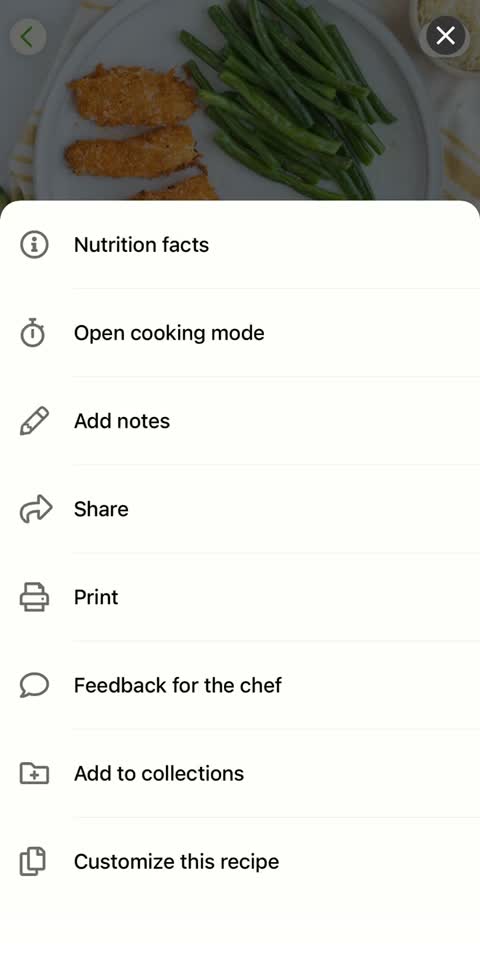
The pictured menu shows Add notes and Customize this recipe. A written reminder such as “use less sauce” does not establish that ingredient quantities, groceries or nutrition have changed. Check the recipe fields themselves if you expect the adjustment to affect them.
The older help article explains adding a note; it does not establish every current editing or deletion control. When preserving an existing note, first copy what is already there. Do not clear its text as a way of leaving the screen: the article’s clear-text instruction concerns exiting without adding a new note.
Copy notes beside the recipe they belong to.
- Identify the dish. Save the formal title, your household nickname and the source link. Mealime’s sharing guide, updated 29 July 2019, describes opening a recipe and choosing More, then Share.
- Keep the recipe itself. Preserve ingredients, measured amounts, servings and every cooking step. A note referring to “the sauce in step five” is useful only if you also retain that step.
- Copy personal text verbatim. Put it under a clear Personal notes heading. If you use screenshots, include the whole note and check the saved image at readable size.
- Add context separately. Explain an abbreviation or identify the pan, but retain the original wording so a later clarification cannot be mistaken for something you recorded at the time.
- Check the saved copy. Compare the first and last lines against the app. Open it from its saved location and confirm that the recipe and note are both present.
Record whether a note changes a quantity, a technique or simply your preference. “Use less sauce” is hard to reproduce several months later. A clearer record names the sauce, the amount used and the portions cooked. If you cannot remember an amount, mark it as unrecorded instead of reconstructing it from a guess.
Turn shorthand into a useful reminder.
Suppose a note says “better with beans; sauce too much”. The following is an illustrative preservation record, not a tested recipe. It shows how to keep what is known and make the missing details visible.
| Record | Example saved entry | Why it matters next time |
|---|---|---|
| Recipe identity | Household name: Friday bean bowls. Add the exact Mealime title and public link. | Connects your nickname to the published dish. |
| Original note | “Better with beans; sauce too much.” | Preserves the actual wording before interpretation. |
| Ingredient change | Used beans. Type, drained amount and ingredient replaced: not recorded. | Identifies the details to recover; “one tin” alone may not give a usable amount. |
| Sauce change | Original note suggests reducing sauce; no smaller quantity recorded. | A preference is kept without inventing a new formula. |
| Serving context | Copy source yield. Record cooked portions separately if known. | A sauce quantity for two portions cannot be interpreted as a four-portion adjustment. |
| Next cooking record | Add date, actual quantities, equipment and your own result after cooking. | Turns an unresolved reminder into a repeatable household version. |
If the source uses 200 g of a sauce for four portions and your own record says you used 150 g for four, that is a specific 50 g reduction. If the cooked yield is unknown, the comparison is incomplete. Keep the original 200 g in the reference recipe and label 150 g as your adjustment; do not silently overwrite the source.
For technique notes, keep the equipment detail that made a difference: the wider pan, the baking dish size or the preparation order. Changing the serving count does not supply a new cooking time. Record the method you actually used and your own result when available.
Separate a web import from your own version.
Mealime’s import guide, updated 6 August 2020, documents Settings → Your Recipes → New → Import from the Web, followed by pasting the URL and choosing Import. That route brings in a recipe from another site. Its source page may remain useful, but it is not a copy of changes you subsequently made in your account.
Mealime also announced the ability to add your own recipes in a staff reply dated 31 December 2018. A later reply in that thread, dated 6 April 2020, described custom ingredients as less integrated than Mealime’s own. This is historical guidance, not evidence of today’s exact ingredient-matching behaviour. Check the saved recipe and resulting grocery entries before relying on a custom version.
For a recipe you wrote or substantially changed, copy its complete current ingredient list, quantities, yield and method. Keep any personal photos separately if you want them preserved. Record the published source as inspiration when applicable, and label which parts are your own changes. A link to the earlier version cannot replace the version you cook.
Use a small, searchable naming system.
Give the backup the name you naturally remember. Keep “Friday bean bowls” together with the formal recipe title, source link and date last checked. One readable document per favourite is enough to begin; you can organise by ingredient or meal type after the important dishes are saved.
Within that document, use three clear headings: Original recipe, Personal notes and Changes still to confirm. Keep a revised full recipe under its own date if you later settle on a household version. That makes it possible to cook from a complete method without forgetting where it came from.
What a backup or MealPot import brings across.
The free browser backup tool accepts public links or pasted recipe text. It does not sign into Mealime or retrieve private notes. With pasted text, inspect the preview and downloaded file: a structured recipe result is not a promise that every free-form comment survived. Keep your complete personal document as the master copy.
To check a pasted recipe, choose Paste text, include the title, servings, ingredients and instructions, then choose Preview recipes. Review the amounts and steps, confirm the review checkbox and download the readable copy. Open that file and look for each note you need; retain any missing note alongside it. The TXT and optional JSON downloads are backups, not an automatic import format for another app.
MealPot is our product. Its individual recipe-link import requires Pro: Recipes → + → Import Recipe → review → save to My Recipes. A public URL does not grant access to Mealime’s private account content, so preserve notes separately and check the imported ingredients and steps. MealPot is available for iPhone and iPad with iOS/iPadOS 17 or later. App Store listing · Import walkthrough.
If you want to keep using Mealime’s catalogue, free Meals Hub is the official continuation through Albertsons Companies apps and websites. Mealime says it supports browsing, plans and lists even without a nearby store. Catalogue access and a personal-note transfer are different things; the official account FAQ does not establish that your notes follow you. Use the switch checklist to check one complete recipe and its notes before moving more.
Frequently asked questions
Does a Mealime share link contain my private notes?
Do not assume so. The documented Share action provides a recipe-sharing route, not a private-note export. Save your personal text separately beside the recipe.
Can I back up a recipe I wrote myself?
Keep a complete readable copy of its ingredients, amounts, servings and instructions, plus your notes and any personal photos. You can submit recipe text to the website backup tool, but retain your original document and compare the result.
Do I need to buy Mealime Pro to access notes now?
The July 2019 notes guide calls notes a Pro feature. Mealime’s current closure notice makes Pro features available to all users, so the older label should not be read as a current purchase requirement.
Does writing a substitution in a note update the grocery list?
A text reminder alone does not establish that a recipe’s ingredient fields changed. Check the actual ingredients and grocery entries when you need the substitution reflected in shopping.